GIS Ultimate Guide Property Mapping Mastery Essentials
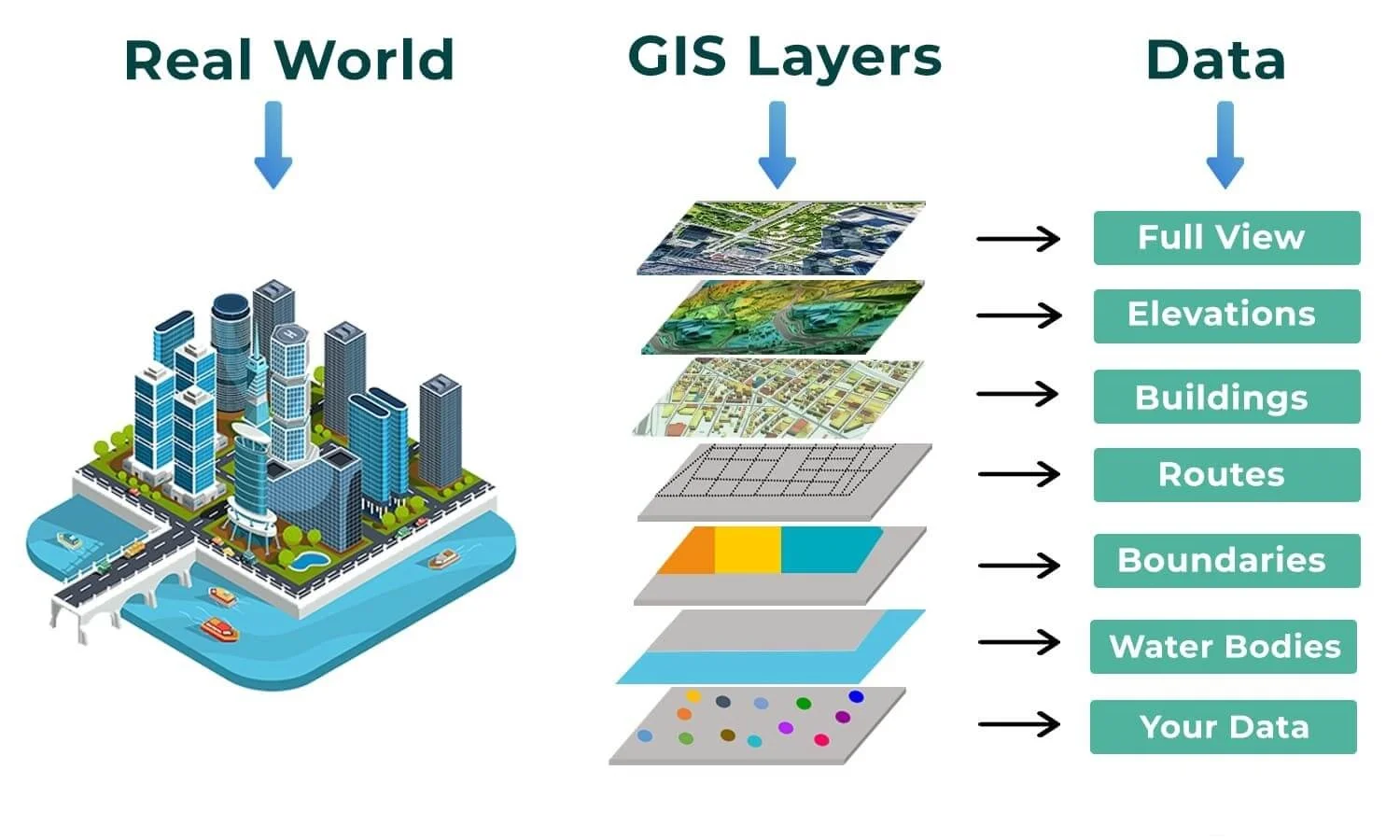
Table of Contents
- Fundamentals of GIS for Property Mapping
- Core Components of GIS for Property Mapping
- GIS Software for Property Mapping: Strengths and Limitations
- Data Collection Methods for Property Mapping
- Traditional Data Sources and Precision Levels for Property Boundaries
- Modern Data Collection Techniques and Cost-Accuracy Trade-offs
- Data Formats for Property Mapping and Their Optimal Applications
- Property Boundary Delineation and Legal Considerations
- Digitizing Property Boundaries from Legal Documents
- Legal Requirements and Compliance in Property Mapping
- Handling Discrepancies in Property Data
- Advanced GIS Techniques for Property Analysis
- Spatial Joins and Buffer Analyses for Hazard Proximity Assessment
- Calculating Property Metrics Using Spatial Statistics and Field Calculations
- Spatial join buildings to parcels, then sum areas
- Raster vs. Vector Analysis for Property-Related Tasks
- Automating Property Mapping Tasks with GIS Scripting and ModelBuilder
- Visualization and Reporting for Property Stakeholders
- Customizing Map Symbology for Non-Technical Audiences
- Dynamic Property Report Templates with Interactive Elements
- Property Details
- Integration with 3D Models and LiDAR Terrain for Immersive Presentations
Geographic Information Systems GIS have revolutionized property mapping by transforming raw spatial data into actionable insights for legal compliance, urban planning, and asset management. This guide explores the technical foundations of GIS software, from open-source platforms like QGIS to proprietary solutions such as ArcGIS, while addressing critical challenges like coordinate system accuracy and legal boundary delineation. By integrating traditional surveying methods with modern technologies such as drone photogrammetry and LiDAR, professionals can achieve unprecedented precision in property data collection and analysis.
The ability to overlay property layers with zoning regulations, environmental risks, and utility networks ensures informed decision-making for stakeholders ranging from real estate developers to government agencies. Advanced spatial analysis techniques—such as buffer zones, spatial joins, and automated workflows—streamline repetitive tasks while maintaining compliance with cadastral and metadata standards. Visualization tools further bridge the gap between technical data and stakeholder communication, enabling clear, interactive reports that highlight property attributes, risks, and opportunities.
Fundamentals of GIS for Property Mapping
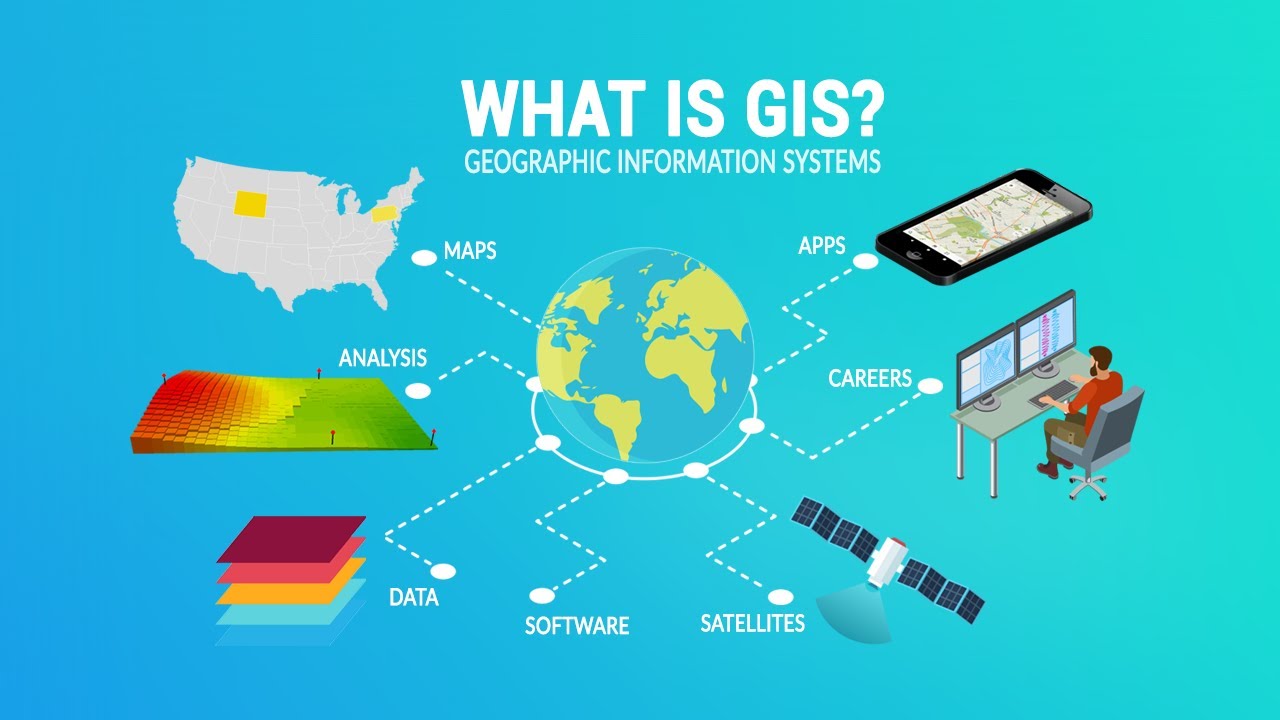
Geographic Information Systems (GIS) serve as the backbone of property mapping by integrating spatial data, analytical tools, and visualization capabilities to support land administration, urban planning, and legal compliance. At its core, GIS for property mapping relies on three foundational components: geographic data (vector and raster datasets representing land parcels, infrastructure, and environmental features), spatial analysis (tools for measuring distances, overlaying layers, and assessing parcel adjacency), and visualization tools (maps, 3D models, and interactive dashboards for stakeholder communication). These components enable precise boundary delineation, zoning compliance checks, and risk assessments tied to property ownership.
The effectiveness of GIS in property mapping depends on the interplay between these components. For instance, geographic data—such as cadastral maps, LiDAR-derived terrain models, or satellite imagery—provides the raw material for defining property boundaries. Spatial analysis then processes this data to identify overlaps, gaps, or encroachments, while visualization tools present findings in legally defensible formats (e.g., certified digital maps). Below, the discussion explores these components in depth, alongside software tools, coordinate systems, and real-world applications critical to property mapping workflows.
Core Components of GIS for Property Mapping
GIS systems for property mapping are built upon three interdependent components, each addressing specific challenges in land administration and spatial planning.Geographic Data
Property mapping requires high-precision spatial datasets, categorized into:
Vector data dominates property mapping due to its ability to represent discrete boundaries with topological accuracy, while raster data enhances analysis by providing contextual layers (e.g., slope stability or flood risk).Spatial Analysis
This component enables quantitative assessments critical for property validation:
Visualization Tools
GIS visualization transforms raw data into actionable insights:
GIS Software for Property Mapping: Strengths and Limitations
Selecting the appropriate GIS software depends on project scale, budget, and technical requirements. Below is a structured comparison of leading tools, emphasizing their suitability for property-related tasks.| Software | Strengths | Limitations | Best Use Cases | ||||||||||||||||||||||||||||||||||||||||||||||||||||||||||||||||||||||||||||||||||||||||||||||||||||||||||||||||||||||
|---|---|---|---|---|---|---|---|---|---|---|---|---|---|---|---|---|---|---|---|---|---|---|---|---|---|---|---|---|---|---|---|---|---|---|---|---|---|---|---|---|---|---|---|---|---|---|---|---|---|---|---|---|---|---|---|---|---|---|---|---|---|---|---|---|---|---|---|---|---|---|---|---|---|---|---|---|---|---|---|---|---|---|---|---|---|---|---|---|---|---|---|---|---|---|---|---|---|---|---|---|---|---|---|---|---|---|---|---|---|---|---|---|---|---|---|---|---|---|---|---|---|
| Esri ArcGIS Pro |
|
|
|
||||||||||||||||||||||||||||||||||||||||||||||||||||||||||||||||||||||||||||||||||||||||||||||||||||||||||||||||||||||
| QGIS |
|
|
|
||||||||||||||||||||||||||||||||||||||||||||||||||||||||||||||||||||||||||||||||||||||||||||||||||||||||||||||||||||||
| GRASS GIS |
|
|
|
||||||||||||||||||||||||||||||||||||||||||||||||||||||||||||||||||||||||||||||||||||||||||||||||||||||||||||||||||||||
| AutoCAD Civil 3D |
|
|
Data Collection Methods for Property MappingProperty mapping relies on precise and reliable data collection to define boundaries, assess land use, and support legal or administrative decisions. Traditional methods, such as cadastral records, aerial photography, and ground surveying, have long served as foundational tools, each offering distinct levels of accuracy and applicability. Modern techniques, including LiDAR, drone photogrammetry, and mobile GIS applications, introduce higher efficiency, cost-effectiveness, and real-time capabilities, reshaping how property data is acquired and analyzed. Understanding the strengths, limitations, and optimal use cases of these methods ensures the selection of appropriate tools for specific project requirements, balancing precision, budget, and operational feasibility.The evolution of data collection technologies has expanded the scope of property mapping, enabling higher-resolution outputs and integration with digital workflows. Below, the comparison of traditional and modern techniques, alongside data validation processes and format considerations, provides a structured framework for implementing effective property mapping strategies. Traditional Data Sources and Precision Levels for Property BoundariesCadastral records, maintained by national or municipal land agencies, represent the most authoritative source for legally recognized property boundaries. These records typically include parcel IDs, ownership details, and boundary coordinates, often derived from historical surveys or digitized maps. Precision varies by jurisdiction, with modern cadastral systems achieving sub-meter to centimeter-level accuracy (e.g., through GPS or total station surveys), while older records may exhibit meter-level discrepancies due to outdated measurement techniques.Aerial photography, captured via manned aircraft or satellites, provides broad coverage and is widely used for updating cadastral data. Vertical aerial photography with 60% forward overlap and 30% side overlap enables stereoscopic analysis, achieving ±0.3 meters to ±1 meter horizontal accuracy at a 1:5,000 scale, depending on flight altitude and sensor resolution. High-resolution satellite imagery (e.g., WorldView-3 at 0.31m GSD) improves accuracy but may require ground control points (GCPs) for sub-meter precision. Ground surveying, including total station surveys and GPS-based methods, delivers the highest accuracy for property boundaries, with ±1 cm to ±5 cm achievable under optimal conditions. Total stations combine electronic distance measurement (EDM) with angular observations, while RTK-GPS (Real-Time Kinematic GPS) provides centimeter-level precision in real-time, though it requires base station infrastructure or correction services. These methods are essential for legal disputes, subdivision planning, or high-stakes property transactions where millimeter-level accuracy is critical. Modern Data Collection Techniques and Cost-Accuracy Trade-offsLiDAR (Light Detection and Ranging) systems use laser pulses to generate 3D point clouds, capturing ground elevation, vegetation, and built structures with vertical accuracy of ±10 cm to ±20 cm and horizontal accuracy of ±15 cm to ±30 cm. Airborne LiDAR is costly (typically $0.10–$0.50 per square meter) but ideal for large-scale projects, while mobile LiDAR (e.g., mounted on vehicles) reduces costs for corridor or urban mapping. LiDAR excels in dense vegetation or complex terrain where photogrammetry may fail, though post-processing and classification require specialized software.Drone photogrammetry leverages multispectral or RGB cameras mounted on UAVs to generate orthomosaics and 3D models. With GCPs and high overlap (70–90%), drones achieve ±2 cm to ±5 cm accuracy at low altitudes (50–100m AGL). Costs range from $0.05–$0.30 per square meter, making it cost-effective for medium-sized projects. Software like Pix4Dmapper or Agisoft Metashape automates processing, but flight planning and weather conditions impact data quality. Drones are particularly useful for floodplain mapping, solar panel inspections, or post-disaster assessments, where rapid updates are required. Mobile GIS apps, such as Esri’s Collector, ArcGIS Field Maps, or Trimble FieldLink, enable real-time data collection via smartphones or tablets. These tools integrate GNSS (GPS/GLONASS/Galileo), IMU (Inertial Measurement Unit), and barometer sensors to achieve ±0.5 m to ±2 m accuracy without RTK corrections. Costs are minimal ($0–$500 per device), and data can be synchronized with cloud-based GIS platforms. Mobile apps are ideal for field verification of cadastral records, utility inspections, or informal settlements, though they lack the precision of survey-grade equipment.
Data Formats for Property Mapping and Their Optimal ApplicationsThe choice of data format influences workflow efficiency, interoperability, and storage requirements. Shapefiles (.shp), a vector format developed by Esri, are widely used for property boundaries due to their attribute-rich structure and compatibility with most GIS software. They store geometry (points, lines, polygons) alongside tabular data (e.g., parcel IDs, ownership), making them ideal for cadastral databases and legal mapping. However, Shapefiles have limitations: they require multiple files (e.g., .shp, .shx, .dbf) and lack native support for complex geometries or large datasets.GeoJSON, an open-standard JSON format, offers human-readable text-based storage and seamless integration with web mapping platforms (e.g., Leaflet, Mapbox). It supports geometric simplicity (points, lines, polygons) and attributes, making it suitable for web-based property portals or collaborative editing. GeoJSON’s lightweight nature reduces bandwidth usage but may not handle high-precision survey data as efficiently as binary formats. KML (Keyhole Markup Language), developed by Google, is primarily used for Google Earth and web mapping applications. It supports 3D models, network links, and time-stamped data, making it useful for property visualization in virtual globes or real estate marketing. However, KML lacks robust attribute management and is less efficient for large-scale cadastral datasets compared to Shapefiles or databases. For high-precision survey data, LandXML or DXF formats are preferred, as they preserve breaklines, spot elevations, and survey metadata. PostgreSQL/PostGIS databases are optimal for enterprise-level property management, offering spatial indexing, query optimization, and version control.
Property Boundary Delineation and Legal ConsiderationsProperty boundaries define ownership, legal rights, and land use regulations, making their accurate digitization and compliance with legal standards critical in GIS-based property mapping. Legal documents such as deeds, surveys, and cadastral records serve as the foundational data sources, but their translation into spatial GIS layers requires precision, edge-matching techniques, and adherence to jurisdictional standards. Discrepancies in property data—such as overlapping parcels or missing records—must be systematically resolved using spatial analysis tools to ensure data integrity. Additionally, overlaying property layers with zoning, utilities, or environmental datasets helps identify conflicts, enabling proactive resolution before legal or operational issues arise.Digitizing Property Boundaries from Legal DocumentsThe process of converting legal descriptions (e.g., metes-and-bounds, rectangular surveys) into GIS-compatible vector layers involves multiple steps to ensure accuracy and consistency. Legal documents often describe boundaries using textual coordinates, bearings, or references to monuments (e.g., "beginning at the northeast corner of Section 12"). These descriptions must be transcribed into spatial data while accounting for scale, datum, and projection discrepancies.Steps for Digitization: 2. Coordinate Conversion and Georeferencing 3. Vectorization and Topology Validation 4. Attribute Enrichment
Legal Requirements and Compliance in Property MappingProperty mapping must comply with cadastral standards, jurisdictional regulations, and metadata requirements to be legally defensible. Non-compliance can lead to disputes, financial penalties, or invalidation of GIS-derived products. Key standards include:1. Cadastral Standards 2. Metadata Standards
3. GIS Tools for Compliance Handling Discrepancies in Property DataDiscrepancies in property data—such as overlapping parcels, gaps, or missing records—arise from errors in surveys, recording mistakes, or conflicting legal instruments. GIS spatial analysis tools enable systematic resolution of these issues.Common Discrepancies and Solutions: 1. Overlapping Parcels SELECT a.ParcelID, b.ParcelID - Conflict Analysis: Advanced GIS Techniques for Property AnalysisGeographic Information Systems (GIS) extend beyond basic mapping to enable sophisticated property analysis through spatial operations, automated workflows, and multi-dimensional data integration. Advanced techniques such as spatial joins, buffer analyses, and raster-vector hybrid modeling enhance decision-making for urban planning, risk assessment, and property valuation. This section explores methodologies for assessing proximity risks, calculating critical property metrics, optimizing analytical approaches, and automating repetitive tasks using scripting and workflow automation.Spatial Joins and Buffer Analyses for Hazard Proximity AssessmentSpatial joins and buffer analyses are foundational techniques for evaluating property exposure to environmental and human-induced hazards. These methods integrate property boundaries with external datasets to quantify risk and inform mitigation strategies.Spatial Joins for Property-Hazard Relationships Buffer Analysis for Proximity-Based Risk Modeling Implementation Workflow Best Practice: Validate spatial joins with a 3% sample of properties to ensure accuracy, especially when dealing with complex geometries (e.g., non-convex polygons). Calculating Property Metrics Using Spatial Statistics and Field CalculationsGIS facilitates the computation of property-specific metrics critical for tax assessment, zoning compliance, and development planning. These calculations leverage spatial statistics, field operations, and geoprocessing tools to derive actionable insights.Key Property Metrics and Calculation Methods
Automating Field Calculations with Python # Example: Calculate Lot Coverage Ratio for all parcels in a feature class Spatial join buildings to parcels, then sum areasjoined = arcpy.SpatialJoin_analysis(buildings, fc, "joined_buildings")building_area = sum([f[0].area for f in arcpy.da.SearchCursor(joined, "SHAPE@")]) row[1] = (building_area / parcel_area) 100 cursor.updateRow(row) Raster vs. Vector Analysis for Property-Related TasksThe choice between raster and vector data models significantly impacts the efficiency and accuracy of property analysis. Each model excels in specific scenarios, often requiring hybrid approaches for comprehensive assessments.Raster Analysis Applications Vector Analysis Applications Hybrid Workflows for Integrated Analysis Example Workflow: Automating Property Mapping Tasks with GIS Scripting and ModelBuilderRepetitive property mapping tasks—such as parcel updates, tax assessments, or zoning compliance checks—can be streamlined using GIS scripting (Python) and ModelBuilder workflows. Automation reduces human error, improves consistency, and scales operations across large datasets.Common Tasks for Automation Visualization and Reporting for Property StakeholdersEffective property visualization transforms complex geospatial data into actionable insights for stakeholders, including investors, legal teams, urban planners, and government agencies. Customized symbology, interactive reports, and integrated data sources enhance clarity, decision-making, and engagement, ensuring non-technical audiences can interpret property attributes such as ownership, valuation, and risk factors. This section explores techniques to design intuitive maps, create dynamic reports, and securely publish property data while maintaining compliance with privacy regulations.Customizing Map Symbology for Non-Technical AudiencesSymbology in property mapping directly influences how stakeholders perceive and interpret data. Poorly designed visualizations can obscure critical information, while strategic use of color, size, and labels improves readability and emphasis. For example, a municipal assessor’s office may use graduated color ramps to highlight property tax brackets, where darker shades represent higher values, while a real estate developer might employ distinct symbols to differentiate between zoning restrictions and easements.Key Principles for Effective Symbology: Example: Property Attribute Symbology Table
Dynamic Property Report Templates with Interactive ElementsStatic PDF reports limit stakeholder engagement, whereas dynamic templates—built using HTML/CSS, GIS layout tools (e.g., ArcGIS Web AppBuilder, QGIS Print Composer), or no-code platforms (e.g., Tableau, Power BI)—enable real-time exploration. Interactive elements such as pop-ups, tooltips, and filters allow users to drill down into specific properties or compare attributes across portfolios.Components of an Effective Dynamic Report: Example: HTML/CSS Template Snippet for a Property Pop-Up Property Details
Parcel ID:
Owner:
Value:
GIS Layout Tool Example (QGIS Print Composer): Integration with 3D Models and LiDAR Terrain for Immersive PresentationsTwo-dimensional maps often fail to convey topographic challenges or vertical property features. Integrating 3D models (e.g., CityGML, SketchUp exports) and LiDAR-derived terrain (e.g., elevation contours, flood risk layers) provides stakeholders with a holistic view of property conditions. This approach is critical for urban planning, infrastructure projects, and environmental assessments.Methods for 3D Integration: Mastering GIS for property mapping is not merely about technical proficiency but about leveraging spatial data to solve real-world challenges—from resolving boundary disputes to optimizing land use. By adopting structured workflows, validating data integrity, and customizing visualizations for diverse audiences, professionals can enhance accuracy, transparency, and efficiency in property management. This guide equips readers with the knowledge to harness GIS tools effectively, ensuring that every map produced is both legally sound and strategically valuable for decision-makers. |
Leave a Comment
Comments are moderated before appearing. The data you submit is processed according to the Privacy Policy of ir.msu.ac.zw.